Qayd workspace · Filing on Qayd is mandatory from 1 January 2027
Upload your trial balance. Get your Qayd file filled and checked.
We place your accounts on the Ministry of Commerce template's lines, build the four financial statements and the notes, and check them against Qayd's rules before you open the file. All you do is review and approve.
- ✓ Reads any accounting system's trial balance
- ✓ Cash flow built automatically, tied to cash
- ✓ Free for one company
What takes your time in the Qayd template?
Hundreds of accounts, more than 200 lines
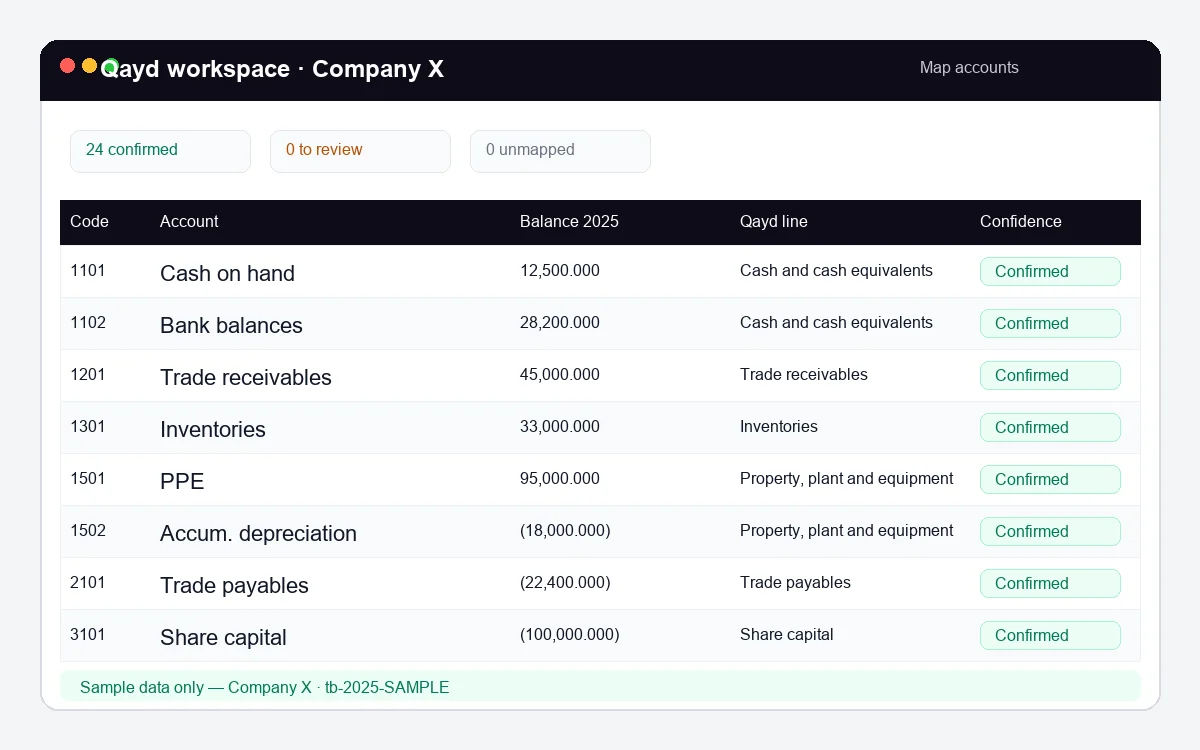
With the workspace: we suggest the right line for every account from its name and code, and you only review the ones we're unsure of. Your choices are saved for next year.
Cash flow and changes in equity, for two years
With the workspace: we build both from the two balance sheets and the income statement, and fill in the year's questions from the account movements. The cash flow ties to balance-sheet cash.
Notes you only find out about after the file is rejected
With the workspace: we list the notes your company needs before you upload, with a draft for each one from its accounts.
Validate, error, fix… then validate again
With the workspace: we check the file against the Qayd template's own rules before you open it, and explain every error in plain words, with where to fix it.
Example: from your accounts to Qayd lines
| Code | Account in your system | Qayd line | Status |
|---|---|---|---|
| 1502 | Accumulated depreciation – furniture and equipment | Property, plant and equipment (deducted from cost) | ✓ Confirmed |
| 2201 | Lease liabilities – long term | Lease liabilities — non-current | ✓ Confirmed |
| 3401 | Current account – Partner A | Partners' current accounts | ✓ Confirmed |
| 5999 | Miscellaneous expenses | Other operating expenses | Review |
An illustrative example. You can change any mapping, and it's saved for your company.
Four steps
-
1
Files
Drop the empty Qayd file from the portal and the trial balances from your accounting system.
-
2
Accounts
Confirm only the lines we are not sure about. Everything already matched stays in a closed list.
-
3
Check
See the four statements, whether they balance, and compare four figures from your audited statements.
-
4
Download
Approve the notes, download the filled Qayd file, and upload it on the Qayd portal.
In year two: you upload just two files, and the mapping is ready from last year.
Your Qayd figures are your audited figures
Upload the trial balance after the audit adjustments, then enter four figures from your audited statements: total assets, equity, profit for the year and cash. We compare them with the file before filling it, and show any difference and its likely cause. You can also share the figures with your auditor to review and approve inside the workspace.
Match with your audited statements
Total assets ✓
Total equity ✓
Profit for the year ✓
Cash at year end ✓
✓ The figures match your audited statements.
For audit offices: all your clients on one screen
- ✓ A list of all your companies, with each company's file status: trial balance, mapping, statements, notes, file.
- ✓ Your team works on the same companies, each user with their own permissions.
- ✓ Mapping and notes are saved for each client, so year two starts where you left off.
- ✓ Your clients share their figures with you to review and approve inside the workspace.
Using Cortex Accounting?
Coming soon: your Qayd file straight from your books, with no export and no upload.
Pricing
Free
For one company
Free
- ✓ 1 company · 1 user
- ✓ Every step: mapping, statements, checks, notes, file
- ✓ Mapping saved for next year
Office
For audit offices
Priced by number of companies
- ✓ Up to 25 companies · 5 users
- ✓ Everything in Free
- ✓ Client list with each file's status
- ✓ Permissions per user
Office Plus
For larger offices
Priced by number of companies
- ✓ Up to 100 companies · 15 users
- ✓ Everything in Office
Frequently asked questions
Which accounting systems are supported?
Any system that exports the trial balance to Excel or CSV, in any column order, as long as it has the account name and debit and credit or a balance.
Will the figures match my audited statements?
Yes, if you upload the final trial balance after the audit adjustments. Before filling, you enter four figures from your audited statements and we compare them with the file, and show any difference and its likely cause.
Why three trial balances in the first year?
Because Qayd asks for a comparative year, and its cash flow and equity need opening balances. From year two, you upload one trial balance.
Is the cash flow really built automatically?
Yes, with the indirect method, from the two balance sheets and the income statement, and it ties to balance-sheet cash. Every figure shows how it was calculated, and you can change the classification.
Is the file ready to upload?
Open it in Excel, enable macros, press the template's validate button, then upload it on the Qayd portal. We checked it against the template's own rules, so we expect it to pass, but the Qayd portal has the final word.
Is this a free XBRL tool?
Yes, free for one company. The Ministry of Commerce's Qayd portal takes the Qayd template in Excel and converts it to XBRL, and the Qayd workspace fills that template for you from the trial balance.
Is my data safe?
Your data is encrypted, and only your account's users and the people you share it with can see it. You can delete any company and all its data at any time.
Is it free?
Yes for one company, with every step included. Audit offices have plans for several companies.
Filing on Qayd is mandatory from 1 January 2027. Get your file ready now.
Free for one company. You sign in with just your email.